Tests
The PyDesignFlow test suite validates core functionality including dependency resolution, result passing, file management, and error handling. All tests use pytest and are located in the tests/ directory.
Basic Flow Execution
Tests in test_single_block.py:
Result.json file creation for all tasks
Sequential execution of dependent tasks
Complex dependency chains with nested dependencies
Result passing and accumulation between tasks
ResultRequiredexception when dependencies are missing
Multi-Block Flows
Tests in test_multiple_blocks.py:
Block-to-block task dependencies
By-ID references (
=A1.stepY) and dependency map references (a.stepY)Parameterized blocks with initialization arguments
Tasks with multiple cross-block dependencies
Result propagation through multi-block chains
Dependency Resolution
Tests in test_dependency_list.py:
Dependency sequence generation and correct task ordering
build_dependencies='missing'vs.build_dependencies='all'modesIncremental builds that skip satisfied dependencies
Always-rebuild tasks that execute even when results exist
Complex multi-level dependency trees
Result Serialization
Tests in test_result.py:
JSON serialization and deserialization of Result objects
Data type preservation: strings, dicts, integers, floats, booleans, Path objects, datetime objects
Result reconstruction from JSON files
Error Handling
Tests in test_exitcode.py:
Subprocess error propagation
SystemExit on task failures
CLI error reporting
Command-Line Interface
Tests in test_cli.py:
Basic task execution via CLI (
flow.cli_main())Dependency resolution through CLI
Status display command
--dry-runflag (print plan without executing)--cleanflag (remove task and block results)Error handling for invalid blocks and tasks
Dot notation parsing (
block.tasksyntax)Empty flow validation
File Management
Tests in test_filemgmt.py:
checkfile()andcheckdir()validationFileCollection for organizing files with custom attributes
Querying, filtering, and iterating file collections
Example Flow
The test suite includes flow_example1, a complete example flow used to test dependency resolution and result passing. It contains an ExampleBlock with 10 tasks that form a complex dependency tree, including tasks with multiple dependencies and tasks marked to always rebuild.
This example flow is used by test_single_block.py, test_dependency_list.py, and test_cli.py to verify correct behavior.
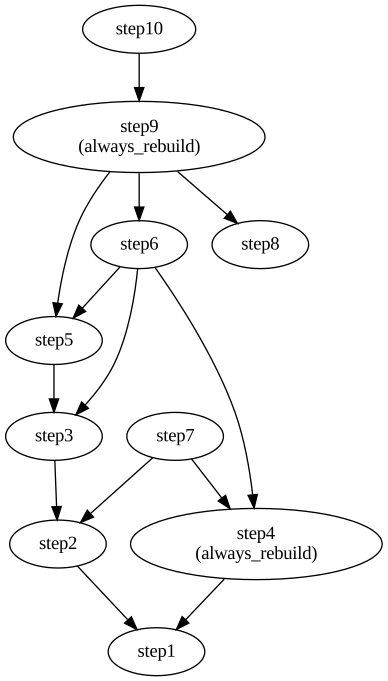
ExampleBlock dependency graph showing the relationships between step1 through step10
Auto-generated Reference
The following documentation is generated using the Sphinx Extension directive. Notice that task dependencies are now clickable cross-references, allowing you to navigate the dependency graph interactively.
Example cross-references: You can reference tasks from anywhere in the documentation:
top.step1- The initial task with no dependenciestop.step2- Depends on step1top.step9- A complex task with multiple dependencies andalways_rebuildflagtop- The ExampleBlock instance